Sticker Chart Maker
Pick a chart, add your child's photo and let them tap a sticker each day until the reward unlocks.
It goes in the middle of the chart and never leaves this device.
Goal, reward and size
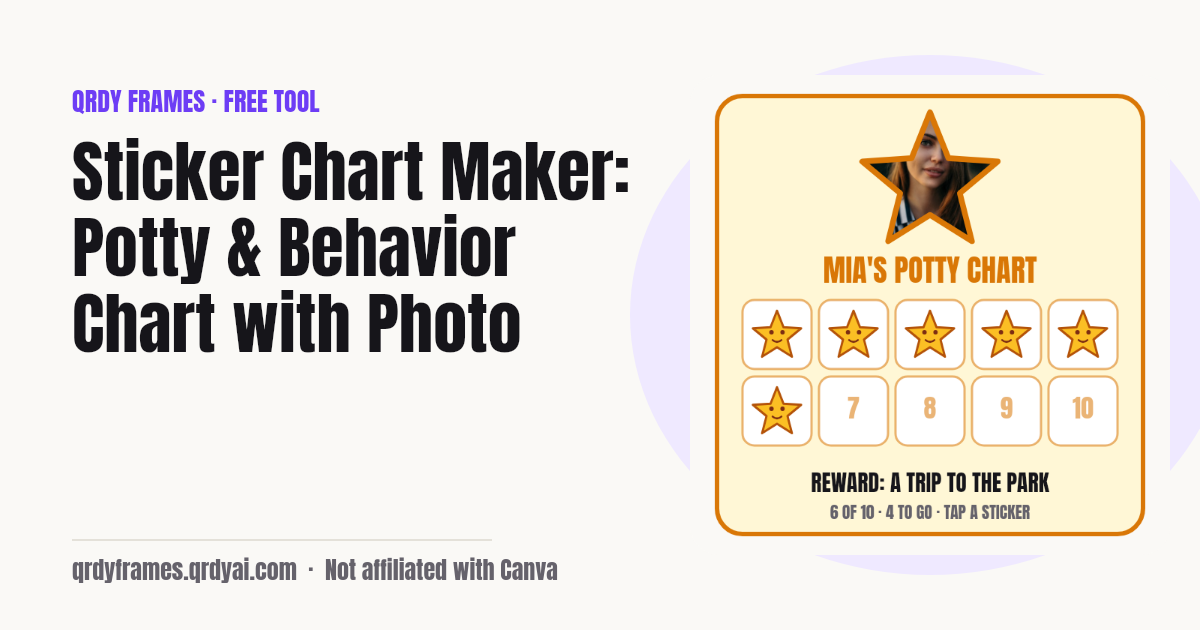
Mia's sticker chart
I used the potty!
Reward: A trip to the park
0 of 10 stickers · 10 to go. Tap a cell to add a sticker.
Undo takes back the last sticker once there is one.
Share with grandparents
A picture such as “Mia got 0 stickers!” with the photo, and a view-only link with the name, goal and stickers (never the photo).
Print a blank chart
Your charts
Saved in this browser after every sticker; one chart per child or goal.
Put the photo in a frame in Canva. Make a bigger poster of the chart or a birthday card with your child’s photo in a heart, star or any shape with Image to Frame.
Open Image to Frame in CanvaNothing leaves your device. The photo is drawn by your browser; to keep the chart, this browser stores the chart and a small photo thumbnail in its own storage. Names, goals and rewards never go to a server or to analytics.
How to make a sticker chart for your child
Pick a chart, add the photo, tap a sticker each day: three steps, no sign-up, nothing to print unless you want to.
- Pick a template (Potty, Chores, Bedtime, Behavior, Nice List) and type your child's name. Add their photo with the box below the chart, or keep the sample, and choose a circle, star or heart frame.
- Each time your child earns it, let them tap the next cell, or press Add today's sticker. The chart saves itself in this browser; Undo takes the last sticker back.
- When every cell is full, Reward unlocked appears: download the certificate with the photo and name. Print a blank chart for the fridge, or share a picture or a view-only link with grandparents.
A potty training chart that works
A potty training chart works best when it is small, immediate and about your child: one sticker right after each success, a reward that comes within days, and their own face on the chart. Start with 5 or 10 stickers for a toddler so the first reward is close; move up to 15 or 20 once the habit holds.
Let your child place the sticker themselves. Tapping the cell on the phone, choosing a star or a rocket and seeing the count go up is part of the reward. Keep the chart on a tablet in the bathroom or print a blank one for the fridge and add real stickers.
Behavior, chores and bedtime charts
A behavior chart rewards one clear, positive goal at a time ("kind words and listening ears", "in bed on time") rather than listing everything a child should not do. Name the goal in your child's words, pick a reward they chose, and give the sticker the same day.
Each child can have their own chart, and one child can have several (potty, bedtime, chores): every chart is saved in this browser and listed under the result, so you switch with one tap. In December, the Nice List template turns good days into a countdown to cookie baking.
Reward certificate and a picture for grandparents
When the last cell is filled, the chart says Reward unlocked and draws a certificate with your child's photo, name, goal and reward: download it as a PNG, print it or put it on the tablet's lock screen.
At any time, Share progress makes a picture such as "Mia got 10 stars!" with the photo and the stickers so far, and opens your phone's share sheet. Where a browser cannot share files, the picture is downloaded and a view-only link is copied instead. That link shows the name, goal and stickers, never the photo.
Printable sticker chart
Print blank chart gives one page with the photo, the name, the goal, numbered empty cells and the reward line, ready for real stickers. The paper size follows your browser's region (Letter in the US and Canada, A4 elsewhere) and can be switched before you print. No PDF and no download needed.
Your child's photo stays on your device
The photo you add is opened by your browser and drawn on the page; it is never uploaded. To keep the chart after a reload, this browser stores the chart and a small thumbnail of the photo (about 20 KB) in its own local storage; delete a chart and its thumbnail goes with it. Nothing goes to a server.
Analytics only counts events such as which template was picked, how full a chart is in quarters, or that a certificate was downloaded; never a name, goal, reward or photo. The view-only link carries the name, goal and stickers after the #, which browsers never send to a server, and never the photo.
Sticker chart maker FAQ
Is this sticker chart maker free?
Yes, completely: no account, no sign-up, no limit on charts and no watermark on the certificate. It is one of the free tools made by the team behind Qrdy Frames.
Does my child's photo get uploaded?
No. The photo is opened and drawn by your browser only. To keep the chart after a reload, a small thumbnail is stored in this browser's local storage, never on a server, and it is removed when you delete the chart.
How many stickers should a potty training chart have?
For a toddler starting out, 5 or 10, so the first reward comes within a few days. Once the habit holds, 15 or 20 keeps it going. Pick the number under Stickers; placed stickers are kept when you change it.
My child tapped by mistake. Can I take a sticker back?
Yes: Undo removes the last sticker placed, and you can press it again to go further back. The chart saves after every change.
Will the chart still be there tomorrow?
Yes, on the same phone or computer and browser: the chart saves itself after every sticker. If the browser blocks storage (some private modes), the page says so; the chart works but is not kept after you close it.
Can I make charts for two children?
Yes. Press New chart for each child or goal; every chart is listed under the result with its progress, and opens with one tap.
Can I print a sticker chart?
Yes. Print blank chart gives one page with the photo, name, goal, numbered empty cells and the reward line, on Letter or A4 from your browser's region, with a toggle.
What does the grandparent link show?
The view-only link shows the child's name, the goal and the stickers so far, plus a button to make a chart of their own. It never contains the photo or the reward line, and it lives after the # so it is not sent to any server.
Which templates are there?
Potty (10 stickers, "I used the potty!"); Chores (15 stickers, "I helped at home"); Bedtime (10 stickers, "In bed on time, no fuss"); Behavior (20 stickers, "Kind words and listening ears"); Nice List (20 stickers, "On the Nice List today"). Every goal and reward line can be changed.
More free tools for parents and teachers
Every tool on this site runs in the browser: nothing you paste, type or upload is sent anywhere.
- Circle Crop Image your child's photo as a round transparent PNG
- Classroom Timer a big visual timer for tidy-up time
- Word Search Maker printable word searches for early readers
- Digital Advent Calendar Maker 24 little messages, one door a day in December
- All free tools
About this site
Qrdy Frames previews custom photo frames for Canva designs; the free tools are a side project of the same team. See also the heart photo frame. Not affiliated with Canva.