QR Code Scanner from Image
Read any QR code from a screenshot, photo or camera, and see where a link really goes before you open it.
Screenshot, photo or picture with one or more QR codes. Read on this device only.
Recent scans
The last 20 codes you scan show up here: their text and type only, never the image, and only in this browser.
Your image never leaves this device. The image, the decoded text and the link check stay in this browser: no upload, no link lookup, nothing in the URL or in analytics. The link check reads the address only and never visits it, so it can warn you but can't promise a site is safe.
How to read a QR code from an image
Add the image, read the cards, check the link: three steps, no app and no account.
- Add the image: paste a screenshot with Ctrl/Cmd+V, drop a photo, tap to choose one, take a photo with the camera, or tap a sample.
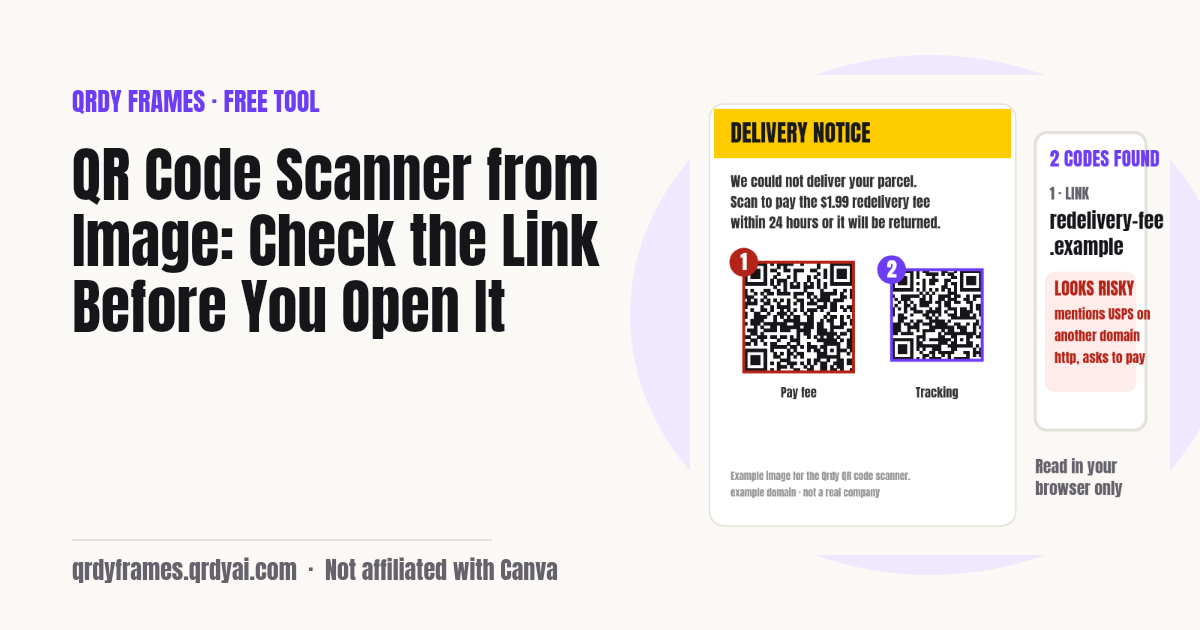
- Read the result: every QR code in the picture gets a numbered box and a card that says what it holds (link, Wi-Fi, contact, event…). If nothing is found the page keeps trying on its own: inverted colours, more contrast, a bigger copy, small parts, rotations.
- Check before you act: a link card shows the real domain on its own line and any warning signs. Open, copy or save only when it looks right, or tap Ask someone to check to send it to a friend.
How to scan a QR code from a screenshot
Take a screenshot of the QR code, then paste or drop it on this page: the code is read in your browser and every link is checked before you open it. You don't need a second phone or an app.
- iPhone: press Side + Volume Up to take the screenshot, then in Photos long-press the code (Live Text) or open this page in Safari, tap the box and pick the screenshot from Photo Library.
- Android: press Power + Volume Down, then open Google Lens from the screenshot, or open this page in Chrome, tap the box and choose the screenshot from Photos.
- Windows: press Win + Shift + S, select the code, then click this page and press Ctrl+V. The snip goes straight from the clipboard into the scanner.
- Mac: press Cmd + Ctrl + Shift + 4 to copy an area to the clipboard, then press Cmd+V on this page. Or drag the screenshot file from the desktop onto the box.
How to scan a QR code on iPhone, Android or a computer
On a phone, open the camera and point it at the code for a second; on a computer, take a screenshot or a photo of the code and add it to a QR code reader like this one.
- iPhone: open Camera, hold the code in view, tap the yellow banner. For a code on your own screen, use a screenshot and this page.
- Android: open the camera or Google Lens and tap the link that appears. Many phones also have a QR tile in Quick Settings.
- Computer: there is no camera pointed at your screen, so screenshot the code (or save the image) and paste it here. A webcam works too: the Camera button takes a photo and reads it.
How to tell if a QR code link is safe
You can't tell from the pattern, so read the link: check the domain (the part right before the first single slash) and be wary of anything that asks you to log in, pay or install an app. QR phishing (quishing) hides a bad link behind a code on a letter, a parking meter, an email or a parcel notice.
This scanner reads the link text and flags these warning signs. It never visits the link, so it can't promise a site is safe; it can only show you what looks wrong.
- http:// instead of https://: the page is not encrypted.
- A number (IP address) instead of a name.
- Look-alike letters from another alphabet in the name (punycode, xn--).
- A brand name in front of, or after, a different domain: paypal.com.example.top, example.top/usps/.
- A brand with a letter swapped or a digit for a letter: paypa1, arnazon.
- A link shortener that hides the final address, which its owner can change.
- Login, verify, account, pay, wallet, password or unlock on a site that isn't a well-known brand.
- A direct download of an app or archive (.apk, .exe, .msi, .dmg, .scr, .zip).
- An @ in the address, more than four subdomains, or an unusual port number.
What each QR code type does
A QR code only holds text; the phone decides what to do with it from how that text starts. This scanner shows each type as a card with the matching actions, and never runs anything on its own.
- Link (https://…): opens a web page. Shown with its domain, the split address and the link check.
- Wi-Fi (WIFI:…): network name, security type and password, with copy buttons and a hidden-network flag.
- Contact (vCard, MeCard): name, phone, email and company, saved as a .vcf file.
- Event (VEVENT): title, time in your time zone and place, added to your calendar as an .ics file.
- Location (geo:): coordinates that open in a maps app.
- Phone, SMS and email (tel:, sms:, mailto:): the number or address with call, text or email.
- Payment and crypto (bitcoin:, upi:…): shown as text with a warning, never as a button, because it asks for money.
- Script (javascript:, data:, file:…): shown as text only. This code holds code, not a link, and we won't open it.
Need to make codes rather than read them? The Bulk QR Code Generator makes hundreds from a list, and Qrdy Dynamic QR makes codes whose link you can change after printing.
Why a QR code won't scan
Most codes that won't scan are blurry, cropped too tight, too small in the picture, or low in contrast. This page retries on its own with inverted colours, more contrast, a bigger copy, small overlapping parts and rotations before it gives up.
- Include the white border around the code (the quiet zone); a code cropped to its edge often fails.
- Hold steady and fill more of the frame; a sharp small code beats a blurry big one.
- Take a screenshot instead of a photo of a screen: photos of screens add stripes (moiré).
- Light-on-dark and coloured codes are read, but very low contrast is not.
- If it still fails, drag a box around the code on the image: the crop is read as soon as you let go.
QR code scanner FAQ
Is it safe to scan a QR code?
Scanning itself is safe: a QR code only holds text, and this page never opens anything on its own. The risk is the link inside. Read the domain, be careful with anything that asks you to log in, pay or install an app, and use the link check here before you tap Open.
Can I scan a QR code from a screenshot?
Yes. Take a screenshot, then paste it here with Ctrl/Cmd+V or drop the file on the box. Small codes inside large screenshots are found too, because the page also searches the image in overlapping parts.
Does this upload my image?
No. The image is read in your browser (a Web Worker with a bundled decoder), the link check is a set of rules that runs on your device, and nothing you scan goes into the URL or analytics.
Can it read several QR codes at once?
Yes. Every code in the image gets a numbered box and its own card, in reading order, and Copy all or Download .txt saves them one per line.
Why doesn't my QR code scan?
The page already retries with inverted colours, more contrast, a bigger copy, small parts and rotations. If all of that fails: use a sharper image, keep the white border around the code, take a screenshot instead of a photo of a screen, or drag a box around the code on the image.
Can I get the Wi-Fi password from a QR code?
Yes. A Wi-Fi QR code holds the network name, the security type and the password in plain text. The Wi-Fi card shows the name and a hidden password with Show and Copy buttons.
Can I make a new copy of a QR code?
Yes, for a link or text code: Download PNG or SVG re-encodes the same content in your browser, sharp enough for print, with no watermark. If you want to change where it points later without reprinting, use a dynamic QR code instead.
Can someone else check a QR code for me?
Yes. Ask someone to check makes a link that carries the decoded content in the part after #, which browsers never send to a server. Your friend sees the same card and link check; the image itself is never shared.
More free tools
Every tool on this site runs in the browser: nothing you paste, type or upload is sent anywhere.
- Bulk QR Code Generator make a fresh batch of QR codes from a list or CSV
- Password Generator a new Wi-Fi password before you print the next code
- Random Color Generator a palette from any image, read in the browser too
- All free tools
About this site
Qrdy Frames previews custom photo frames for Canva designs; the free tools are a side project of the same team, which also makes Qrdy Dynamic QR. Not affiliated with Canva.
QR decoding: the browser's BarcodeDetector where it reads QR codes, otherwise zxing-wasm 3.1.6 (MIT, a WebAssembly build of zxing-cpp, Apache-2.0), self-hosted. Remake: Nayuki QR Code generator (MIT), bundled.