2027 Calendar
Free printable 2027 calendar with US holidays: the whole year on one page or one month per page, Letter or A4, Sunday or Monday start, with your own birthdays and dates printed right on it.
Prints the whole 2027 year on one Letter page, portrait, Sunday start.
Advanced: week numbers, weekends, footer
Your events and print settings are kept in this browser only; nothing is uploaded.
- Jan 1New Year's Day
- Jan 18Martin Luther King Jr. Day
- Feb 14Valentine's Day
- Feb 15Presidents' Day
- Mar 17St. Patrick's Day
- Mar 28Easter Sunday
- May 9Mother's Day
- May 31Memorial Day
- Jun 18Juneteenth (observed)
- Jun 19Juneteenth
- Jun 20Father's Day
- Jul 4Independence Day
- Jul 5Independence Day (observed)
- Sep 6Labor Day
- Oct 11Columbus Day / Indigenous Peoples' Day
- Oct 31Halloween
- Nov 11Veterans Day
- Nov 25Thanksgiving
- Dec 24Christmas Day (observed)
- Dec 25Christmas Day
- Dec 31New Year's Eve
Nothing leaves your device. The calendar is drawn in this browser; your events are kept in local storage only, and no name or date you type is ever sent to a server or into analytics. The URL carries only the view and the month; a family link you share carries the dates after the #, which never reaches a server.
How to print a 2027 calendar
Pick a layout, pick the paper, press Print: three steps, no sign-up, and the whole 2027 year with its holidays is already on screen when the page opens.
- Under Print options (right below the Print button), choose the week start (Sunday is the US default) and the layout: the whole 2027 year on one page, or one month per page with writing space (all 12 months or a range).
- Pick the paper, Letter or A4, and portrait or landscape. Under Advanced you can add week numbers, shade the weekends, hide the observances, add notes lines to the month pages or print in black and white.
- Press Print: the print dialog opens with only the calendar on the page, no site header or footer. Choose Save as PDF there to keep a file. Your own events (My events tab) print on the calendar too.
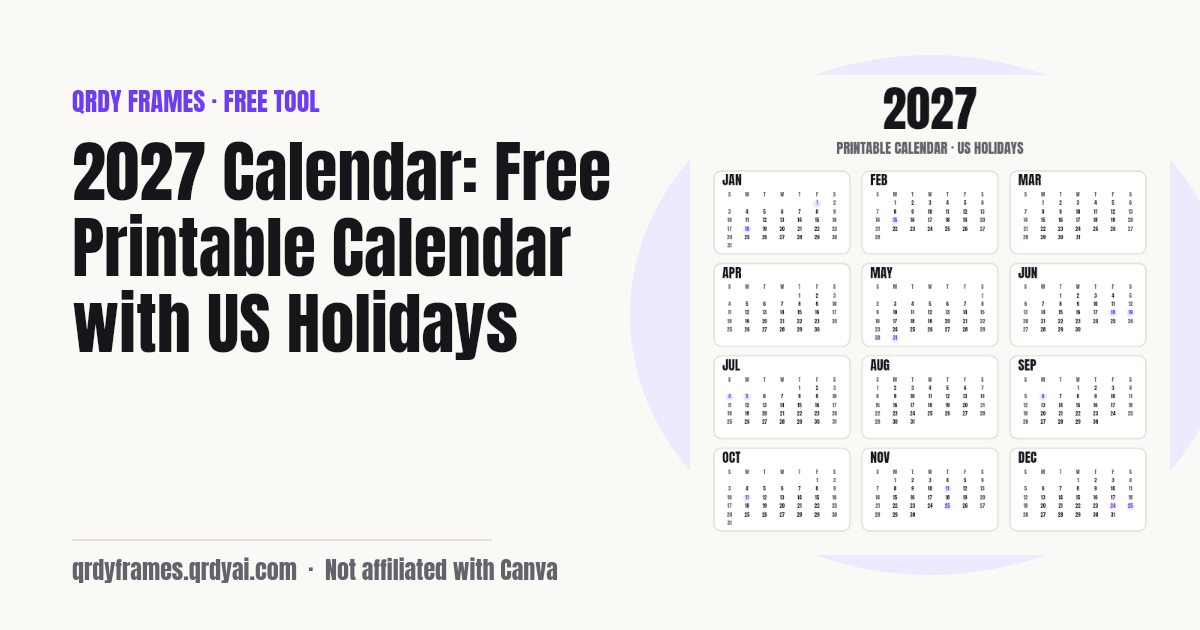
2027 US holidays
2027 has 11 US federal holidays, and 3 of them fall on a weekend and are observed on a weekday: Juneteenth (Sat Jun 19, observed Fri Jun 18), Independence Day (Sun Jul 4, observed Mon Jul 5), Christmas Day (Sat Dec 25, observed Fri Dec 24). Thanksgiving 2027 is Thursday, November 25, 2027 and Christmas Day is a Saturday. The table below lists every federal holiday and the 7 popular observances the calendar can show; all of them are computed by rule (the third Monday of January, the last Monday of May, the fourth Thursday of November, the Easter algorithm), not typed by hand.
| Holiday | Date | Weekday | Observed |
|---|---|---|---|
| New Year's Day | January 1 | Friday | same day |
| Martin Luther King Jr. Day | January 18 | Monday | same day |
| Valentine's Day (observance) | February 14 | Sunday | — |
| Presidents' Day | February 15 | Monday | same day |
| St. Patrick's Day (observance) | March 17 | Wednesday | — |
| Easter Sunday (observance) | March 28 | Sunday | — |
| Mother's Day (observance) | May 9 | Sunday | — |
| Memorial Day | May 31 | Monday | same day |
| Juneteenth | June 19 | Saturday | Friday, June 18 |
| Father's Day (observance) | June 20 | Sunday | — |
| Independence Day | July 4 | Sunday | Monday, July 5 |
| Labor Day | September 6 | Monday | same day |
| Columbus Day / Indigenous Peoples' Day | October 11 | Monday | same day |
| Halloween (observance) | October 31 | Sunday | — |
| Veterans Day | November 11 | Thursday | same day |
| Thanksgiving | November 25 | Thursday | same day |
| Christmas Day | December 25 | Saturday | Friday, December 24 |
| New Year's Eve (observance) | December 31 | Friday | — |
Observances are not days off; they are the dates people most often want on a wall calendar. Hide them under Advanced if you only want the federal holidays.
Is 2027 a leap year?
No, 2027 is not a leap year: it has 365 days, and the next leap year is 2028, which has 366 days with a February 29. 2027 starts on a Friday (January 1) and ends on a Friday (December 31), and it has 52 ISO weeks. Because the year starts and ends on the same weekday, a 2027 calendar lines up like the previous one shifted by one day.
Add your own events
Your events are saved on your device and printed on the calendar: open the My events tab, type a name, pick a 2027 date, choose a type (birthday, anniversary, school, trip or other) and press Add event. The event appears in the Year and Month views, in the countdown list ("Mom's birthday in 23 days"), and in the printed cells in full. Birthdays and anniversaries repeat every year by default, so they also show on the 2028 countdown; a school date or a trip does not repeat unless you tick the box.
Everything is kept in this browser's local storage under one key (qrdy.calendar.v1), up to 200 events, and nothing is sent to a server: not the names, not the dates, not even to analytics, which only count how many events you have as a range. Clearing site data removes them. If the browser blocks storage, the page still works and prints, but the events are gone when you leave, and the page says so.
Running a classroom? Time the lesson with the Classroom Timer and print a game for the last day of term with the Bingo Card Generator.
Collect the family's dates in one link
Send one link and the whole family fills in the calendar: on the My events tab press Share our family dates (add a title such as "The Tran family 2027" if you like) and post the link in the family group chat. Relatives open it, see the 2027 calendar with your dates and the US holidays, press Add your dates and send back, add their own birthdays and anniversaries, and share a new link with everyone's dates. You open that link, press Add these to my calendar (dates already there are not added twice), and everyone prints the same calendar.
The dates travel inside the link itself (after the #), so they are never stored on our server, and only month and day are shared, never a year of birth. On the Month tab, Share this month makes a picture of the month for the group chat (a post or a story size) with the birthdays and a short countdown. Add to phone calendar saves an .ics file for Google Calendar, Apple Calendar or Outlook, with birthdays repeating every year and, if you tick it, a reminder on the 25th of each month to print the next page.
The same family dates make a good photo calendar gift for grandparents: put a photo above each month in Canva with Calendar Maker.
Try Calendar Maker in Canva for the photo calendar, or open My events to start the family list.
Make a photo calendar
To make a 2027 calendar with your own photos, use Calendar Maker, the Canva app from the team behind this site: it adds ready calendar tables for any month of 2027 to a Canva design, so you drop a photo above each month, pick the fonts and colours of your design and print it or share it as a PDF. The calendar on this page is the quick, plain version for the fridge, the classroom wall or a planner; the photo calendar is the one you give as a gift.
Try Calendar Maker in Canva. For the photos themselves, the seasonal frames on this site drop into the same design: Christmas frames, Valentine’s Day frames or all themes by month.
Is my information saved or uploaded?
Nothing is uploaded: the calendar is drawn in your browser and your events live only in this browser's local storage. The page URL carries only the tab and the month (for example ?view=month&m=3), never an event name, and the analytics record only settings and counts (layout, paper, week start, how many events as a range). A family link is the one exception you choose: it carries the names and month-days after the # of the link, a part browsers never send to a server, so only the people you send it to can see them. Printing happens through your browser's print dialog, on your own printer or as a PDF on your device.
2027 calendar FAQ
Is this 2027 calendar free to print?
Yes, completely free: no account, no sign-up, no watermark and no limit on how many times you print. Press Print and choose your printer, or pick Save as PDF in the print dialog to keep a 2027 calendar PDF. It is one of the free tools made by the team behind Qrdy Frames.
Can I print one month per page?
Yes. Under Print options choose "1 month per page": each month prints as a large grid with writing space in every cell, all 12 months or just the range you pick (for example March to June), with optional notes lines under the grid. On the Month tab, "Print this month" prints the month on screen only. The whole year on one page is the other layout.
Does it include US holidays?
Yes. The 11 US federal holidays of 2027 are marked on every grid and listed under each month, with the observed weekday when a holiday falls on a weekend (Juneteenth, Independence Day and Christmas Day in 2027). Popular observances (Valentine's Day, St. Patrick's Day, Easter, Mother's Day, Father's Day, Halloween, New Year's Eve) are on by default and can be hidden under Advanced.
When is Thanksgiving 2027?
Thanksgiving 2027 is Thursday, November 25, 2027, the fourth Thursday of November. The day after, Friday, November 26, is Black Friday.
When is Easter 2027?
Easter Sunday 2027 is Sunday, March 28, 2027. Good Friday is Friday, March 26, 2027 and Easter Monday is Monday, March 29, 2027. Easter is computed by the standard Gregorian algorithm, the same one that puts Easter 2026 on April 5 and Easter 2028 on April 16.
Is 2027 a leap year?
No. 2027 has 365 days; February has 28 days. The next leap year is 2028. 2027 starts on a Friday and ends on a Friday, and has 52 weeks.
Can the week start on Monday?
Yes. Choose Monday under Week starts and every grid, on screen and in print, puts Monday in the first column and the weekend at the end, the common layout in Europe and the ISO standard. Sunday start is the US default. Week numbers (Advanced) are always ISO week numbers, which run Monday to Sunday.
Can I add birthdays and events?
Yes: on the My events tab, type a name, pick a 2027 date and a type, and press Add event. Events show on the year and month grids, print in the cells in full, and the countdown list tells you how many days are left. Birthdays and anniversaries repeat every year (into 2028 as well); other events repeat only if you tick "Repeats every year". Edit or delete an event from the list. Up to 200 events are kept in this browser.
Can I print on A4?
Yes. Choose A4 under Paper (Letter is the US default) and portrait or landscape; the page size is set for the print dialog, so the year fits on one sheet and every month page fits with no cut-off rows, even months that need six rows. Check that the printer's paper setting matches, and leave Scale at 100%.
Is my information saved or uploaded?
Your events are saved only in this browser (local storage, one key: qrdy.calendar.v1) and are never uploaded. The page URL never contains an event name (only a family link you choose to share does, after the #), and analytics only receive settings and counts. Clearing site data removes the events; with storage blocked, the page works but forgets them when you leave.
Can my family add their birthdays to my calendar?
Yes. On the My events tab press Share our family dates and send the link to the family chat. Each relative opens it, presses Add your dates and send back, adds their birthdays and shares a new link; you open it and press Add these to my calendar. Dates already on your calendar are not added twice, up to 100 dates travel in one link, and nobody needs an account.
Who can see the dates I share?
Only people who have the link. The names and dates are inside the link itself (after the #, the part browsers never send to a server), so they are never stored on our server and never reach our analytics. Anyone you forward the link to can see them, so share it in the family chat only; no year of birth is ever asked or shared.
More free tools
Every tool on this site runs in the browser: nothing you paste, type or upload is sent anywhere.
- Classroom Timer countdown with quick buttons, presets, chains and a Pomodoro mode
- Bingo Card Generator printable bingo cards from your words, a bingo caller and a winner check
- Random Team Generator split names into fair random teams
- Yes or No Wheel spin for a yes or no, with history and best of 3
- Random Letter Generator random letters with no repeats, a letter wheel, random words
- Random Color Generator random colours and palettes, a palette from a photo, a colour of the day
- Lorem Ipsum Generator dummy text with exact counts and placeholder images at any size
- Password Generator strong passwords, passphrases and PINs
- Bulk QR Code Generator one QR code per row of a class list or sheet
- Christmas Ornament Photo Maker
- Circle Crop Image
- Heart Photo Frame
- All free tools
About this site
Qrdy Frames previews custom photo frames for Canva designs; the free tools are a side project of the same team, which also makes Calendar Maker. Not affiliated with Canva.