Random Color Generator
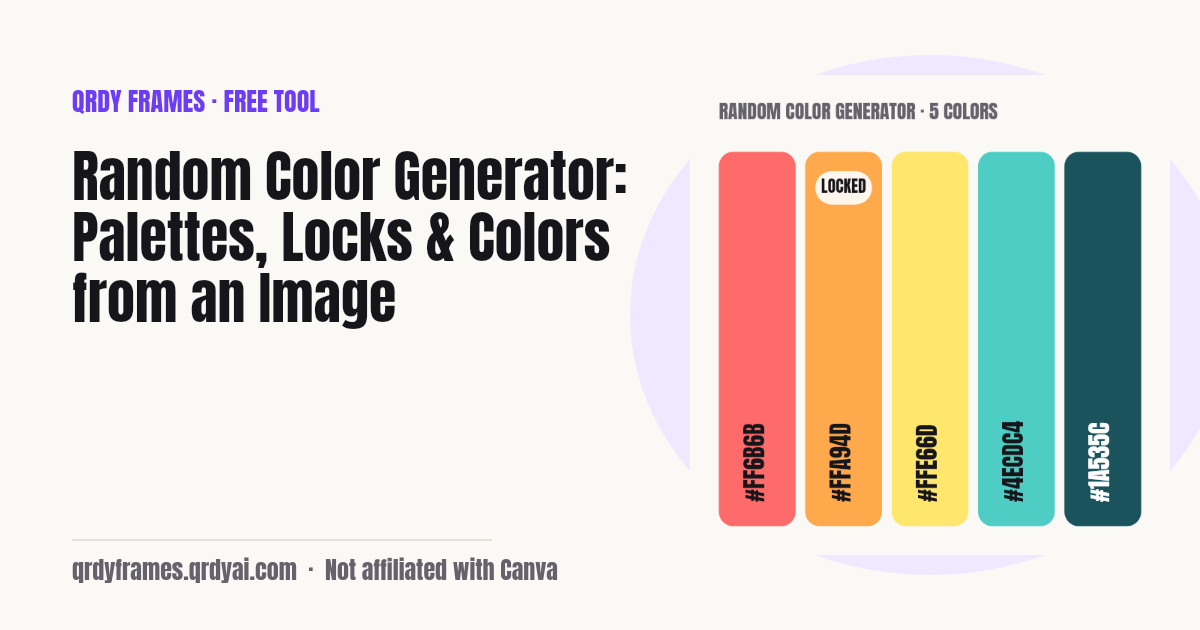
A random color or a 5-color palette on every press of Space, with locks, styles and harmony rules, a color palette from any photo, and one color of the day to practise with.
- #4EFD80
- #6F2ACF
- #B6F2C0
- #4863DB
- #62C085
Advanced: harmony rule, export (CSS, JSON, PNG), contrast check, save palette
Nothing leaves your device. Colors are generated in this browser, a photo on the From image tab or the artwork you add for a daily entry card is read into a canvas on your device and released when you replace it or leave, and your settings, saved palettes, undo history, streak and match counts are kept in local storage only. No palette name, color code or image data is ever sent to a server or into analytics. The URL carries only the tab, the color codes of a share link you made yourself, or the date of a shared challenge.
How to generate random colors
Press Space, lock what you like, copy the codes: three steps, no sign-up, and a five-color palette is already on screen when the page opens.
- Press Generate or the Space bar: a new random color, or a palette of 5 colors, appears at once (a palette is already on screen when the page opens). Pick Single color or Palette and set the size (3–8) with the slider.
- Lock the colors you like with the Lock button on each swatch and generate again: locked colors stay, only the others change. Choose a style (Any, Pastel, Dark, Vivid, Muted, Harmony) and, for Harmony, a rule under Advanced (Analogous, Complementary, Triadic, Split-complementary, Monochrome).
- Copy a color as HEX with its Copy button, or as RGB or HSL from the small menu; Copy all gives the HEX list, and Advanced exports CSS variables, JSON or a PNG strip. Undo and Redo walk back through earlier palettes, Save palette keeps one for later, and Share link makes a URL with just the codes.
How to get a color palette from an image
Drop a photo on the From image tab and the tool returns its 5–8 dominant colors with the share of the picture each one covers, without uploading the photo anywhere. The image is read from your device into a small canvas (at most 200 px on the long side, so even a 12-megapixel photo becomes a few thousand pixels and the analysis takes milliseconds), its pixels are grouped by median cut and refined with a few k-means passes, and each group's average becomes one swatch, sorted from the most to the least common. Transparent pixels in a PNG are ignored.
The photo only ever exists as a temporary object URL inside this browser tab: it is released as soon as you replace it or leave the page, there is no image API on this site, and nothing about the picture is written to storage or sent to analytics. Tap a swatch to copy its HEX, or press Use as palette to carry the colors over to the Generate tab, where you can lock the ones you want, regenerate the rest in a style, check contrast, export CSS or save the palette for later.
- Open the From image tab and drop a photo, or tap the box to pick one. A sample photo is shown until you do.
- The tool draws a small copy (at most 200 px on the long side) on a canvas in your browser, groups its pixels and shows 6 dominant colors with the share of the picture each one covers; set 5–8 colors with the slider.
- Tap a color to copy its HEX, or press Use as palette to send all of them to the Generate tab, unlocked, where you can lock, regenerate, export and save them.
Looking for the image tab by name? /tools/color-palette-from-image opens this page on it; /tools/random-color-palette opens the Generate tab. Want the photo itself in a shape rather than its colors? The circle crop image and the heart photo frame crop a picture in the browser, like this page.
Color harmony rules
A color harmony rule picks hues at fixed distances on the color wheel so the colors look like they belong together. Set Style to Harmony and choose one under Advanced:
- Analogous: hues next to each other on the wheel, 30° apart (blue, blue-green, green): calm and natural, easy to read.
- Complementary: two hues opposite each other, 180° apart (orange and blue): the strongest contrast, good for one accent against a base.
- Triadic: three hues evenly spaced, 120° apart (red, yellow, blue): lively and balanced when one hue leads and the others support.
- Split-complementary: a base hue plus the two hues either side of its complement, at 150° and 210°: the punch of complementary with less tension.
- Monochrome: one hue in several lightnesses, from dark to light: always harmonious, so it suits backgrounds, charts and type.
Working inside Canva? Color Harmony, our Canva app, applies the same rules to the colors of the design you have open: try Color Harmony in Canva.
HEX, RGB and HSL
HEX, RGB and HSL are three ways of writing the same color, and every swatch on this page can be copied in each:
- HEX: six hexadecimal digits after a #, two each for red, green and blue (#ff6b6b): the form CSS, design tools and brand guides use most.
- RGB: the same three channels as numbers from 0 to 255 (rgb(255, 107, 107)): what screens actually mix, handy in code that blends or compares colors.
- HSL: hue as degrees on the color wheel, saturation and lightness as percentages (hsl(0, 100%, 71%)): the easiest to reason about when you want a lighter, duller or opposite version of a color.
Mocking up the rest of a page at the same time? The lorem ipsum generator gives dummy text and placeholder images, and the password generator fills a sign-up form with realistic sample passwords, both without uploading anything.
Color of the day
The color of the day is one 5-color palette per calendar day, the same for everyone who opens the page on that date, with a small prompt such as "Draw something using only these 5 colors". It is computed from the date (your local date, as YYYY-MM-DD) with a fixed seed in your browser, so there is no server, no account and nothing to wait for; the harmony rule and every color follow from the date.
Press I made it when you have finished the day's challenge and the page counts your streak ("3 days in a row"), kept in this browser's local storage. Miss a day and the streak starts again from zero, with your best run still shown. The challenge log under the palette is a month calendar: every past day shows its palette, finished days get a check, and tapping one opens it for practice (practice days never change the streak); tomorrow's palette is not shown until tomorrow.
Daily color palette challenge
The daily color palette challenge is one 5-color palette a day for everyone: make a drawing, painting, pixel piece or design with only those colors, post it, and come back tomorrow for the next one. Working with a limited palette is a classic art exercise (fewer colors means fewer decisions and a stronger mood), and daily color prompts already have their own hashtags, like Huevember every November.
Share challenge draws a card with the day's swatches, their HEX codes, the date and the prompt (story 1080 × 1920 or post 1080 × 1350) and a link such as /tools/random-color-generator#day=2026-11-12 that holds only the date, so friends or your art Discord open exactly the same palette. When you have finished, Add your piece reads your artwork on a small canvas in your browser, checks which of the 5 colors it uses ("You used 4 of 5 colors") and Share my piece makes an entry card with your art, the palette and the count. Press I made it to keep your streak, and Share my month turns the month's finished palettes into one recap card.
Running the challenge with a class or a group? The random team generator splits people into teams, and the classroom timer times a 20-minute speed paint.
Is my photo uploaded?
No: the whole tool is client-side. Colors are generated in your browser, the photo on the From image tab and the artwork you add for a daily entry card are read into a canvas on your device and never sent anywhere or saved (there is no image API on this site; for an entry only the number of colors used is kept), and your settings, saved palettes, undo history and streak live in this browser's local storage under one key (qrdy.color.v1). Analytics record only settings and counts (mode, size, style, the number of colors, a streak range), never a palette name, a color code or anything about your photo; color codes appear in the share link only when you make one. If your browser blocks storage, the tool still works and tells you that palettes will not be kept.
Random color generator FAQ
Is the random color generator free?
Yes, completely: no account, no sign-up, no limit on colors, palettes, exports or saved palettes, and no watermark on the PNG strip. It is one of the free tools made by the team behind Qrdy Frames.
How do I lock a color?
Press Lock on the swatch (or tap the swatch's lock icon with a finger). Locked colors stay in place when you press Generate or Space; only the unlocked ones change. With Style set to Harmony, the first locked color becomes the base hue and the rest of the palette is built around it. Press Lock again to unlock, and your locks are remembered for the next visit.
How do I get a palette from a photo?
Open the From image tab (or https://qrdyframes.qrdyai.com/tools/color-palette-from-image), drop a photo or tap to pick one, and the tool shows 6 dominant colors with the share of the picture each covers; the slider sets 5–8. Tap a color to copy it or press Use as palette to bring all of them to the Generate tab. A sample photo is shown until you add yours.
Is my photo uploaded?
No. The photo is read into a canvas inside your browser, scaled down to a small copy for the analysis, and released when you replace it or leave the page. There is no upload and no image API on this site, and nothing about the picture goes to storage or analytics.
Can I copy HEX, RGB and HSL?
Yes. Each swatch has a Copy button for the HEX code and a small menu for RGB (rgb(255, 107, 107)) and HSL (hsl(0, 100%, 71%)). Copy all copies the whole palette as a HEX list, one per line, and Advanced has CSS variables, JSON with all three forms, and a PNG strip.
Can I save palettes?
Yes. Press Save palette (under Advanced), type a name if you want one, and the palette appears in your saved list, where you can apply, rename or delete it; up to 30 are kept in this browser's local storage. Your settings (mode, size, style, harmony rule) and locks are restored on the next visit too, and Undo still has the last 20 palettes.
How do I share a palette?
Press Share link: the tool copies a URL like /tools/random-color-generator?c=ff6b6b-4ecdc4-ffe66d that carries only the color codes. Anyone opening it sees the same palette and can lock, change and save it. No names, no account.
What is a good contrast ratio for text?
WCAG asks for at least 4.5:1 between text and its background for normal text (AA) and 3:1 for large text (18 pt, or 14 pt bold); AAA raises that to 7:1 and 4.5:1. Black on white is 21:1, the maximum. The Contrast check under Advanced takes any two colors of the palette and shows the ratio with the AA and AAA results for normal and large text.
What is the color of the day?
One 5-color palette per calendar day, the same for everyone on that local date, computed from the date in your browser with a fixed seed. Open the Color of the day tab, follow the prompt, press I made it and the page keeps your streak in local storage; a missed day resets it to zero. The challenge log calendar shows every past day's palette (tap one to practise it, which does not change the streak), but not tomorrow's.
Is my artwork uploaded when I make an entry card?
No. Your piece stays in your browser: it is read into a canvas on your device to count the colors it uses and to draw the entry card, and it is released when you replace it, change the day or leave the page. It is not saved (only the number of colors used is kept for that date) and nothing about it goes to a server or into analytics.
How do I invite friends to the same palette?
Press Share challenge on the Color of the day tab. It sends a link to that date's palette (like /tools/random-color-generator#day=2026-11-12, only the date) together with a card of the swatches, so everyone who opens it gets the same five colors and can post their own piece.
What is the difference between random color and harmony?
Any, Pastel, Dark, Vivid and Muted pick every color independently inside a window of saturation and lightness (pastel is light and soft, dark is deep, vivid is saturated, muted is greyed). Harmony picks hues at fixed distances on the color wheel using the rule under Advanced (Analogous, Complementary, Triadic, Split-complementary, Monochrome), so the colors match by construction.
More free tools
Every tool on this site runs in the browser: nothing you paste, type or upload is sent anywhere.
- Font Pairing Google font pairs with a live preview of your text
- Lorem Ipsum Generator dummy text and placeholder images
- Password Generator strong passwords, passphrases and PINs
- Bulk QR Code Generator one QR code per row of a list or sheet
- Bingo Card Generator printable bingo cards, a caller and a winner check
- Classroom Timer countdown with presets, chains and a Pomodoro mode
- Random Team Generator split names into fair random teams
- Yes or No Wheel spin for a yes or no, with history
- Random Letter Generator random letters, a letter wheel, random words
- Christmas Ornament Photo Maker
- Circle Crop Image
- Heart Photo Frame
- All free tools
About this site
Qrdy Frames previews custom photo frames for Canva designs; the free tools are a side project of the same team, which also makes Color Harmony and Image to Frame. Not affiliated with Canva.