Photo Countdown Maker: New Year, Christmas and Birthday Countdown
Pick the day, add a family photo and watch it fill the number while the days, hours, minutes and seconds tick down.
Midnight on January 1, in this device’s own time zone. For the kids, try Early New Year.
It fills the number. JPG, PNG, WebP or HEIC, never uploaded.
Starting the countdown…
Make this number frame in your own design
Text to Frames turns 2027 (or any word) into a real frame in Canva: drop the photo in, resize it, add your own text around it.
Type 2027 in Text to Frames and pick Roboto, the same free font as this countdown.
Your countdowns
Change the event, the date or the photo and the countdown saves itself here, in this browser, to open again tomorrow.
Nothing leaves your device. The photo is drawn by your browser; to bring a countdown back tomorrow, this browser keeps the event, the date, the title and a small JPEG thumbnail of the photo in its own storage. Titles, names and the photo never go to a server or to analytics, and the share link never carries the photo.
How to make a photo countdown
Pick the day, add the photo, download or go full screen: three steps, no sign-up, nothing uploaded.
- Pick the event: New Year, Early New Year (7 to 10 pm on December 31), Christmas, a birthday or a custom date with a title. The countdown starts at once in your own time zone.
- Add a family photo (or keep the sample). It fills the year or the number of days left, and the days, hours, minutes and seconds tick live under it.
- Press Download countdown image for a story or square PNG, Full screen for the TV with the 10-second finale, or Share to send the family a link to the same countdown.
Need minutes instead of a date? The Classroom Timer counts down minutes and seconds in class. Counting down to Christmas one door a day? Try the Advent Calendar Maker.
Early New Year countdown for kids
An early New Year countdown lets small children celebrate at 7, 8, 9 or 10 pm on December 31 instead of staying up until midnight. Pick Early New Year, choose the hour, and the countdown runs to that time in your own time zone: the last ten seconds show huge numbers to shout along with, then confetti and "Happy New Year 2027!".
Put it on the TV with Full screen (the screen stays awake where the browser allows it) and press Preview the last 10 seconds beforehand to show the kids what will happen. When the real midnight comes the countdown simply rolls on to next year's Dec 31.
Your family photo inside the number
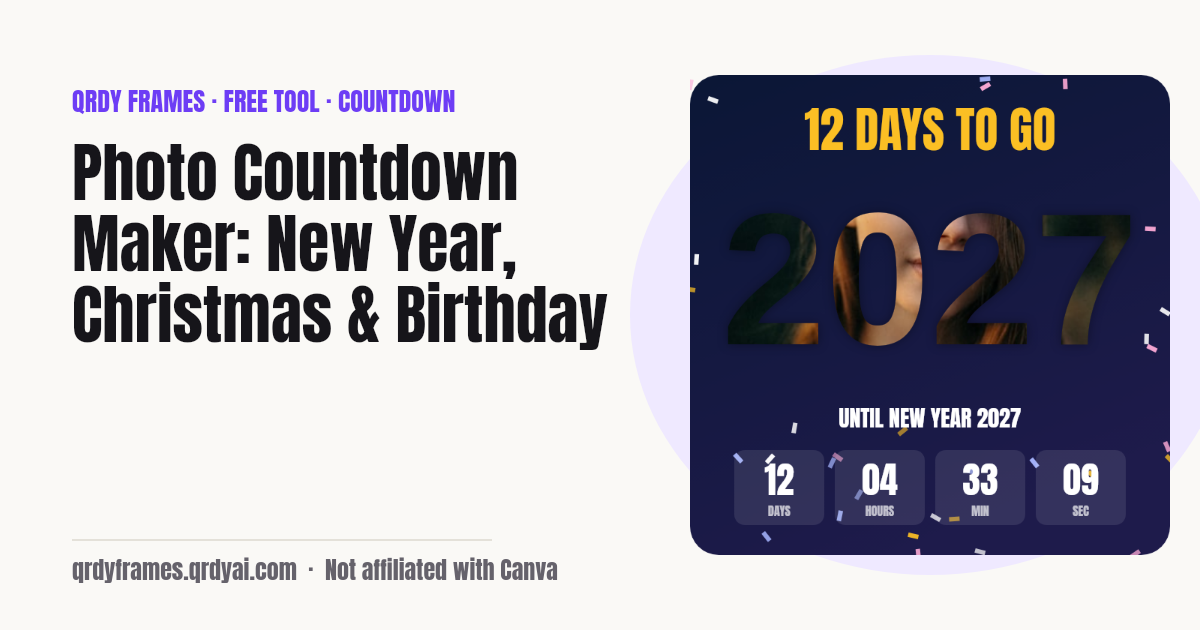
The year, or the number of days left, is drawn as a frame with your photo inside: the same letter outline as the Text to Frames app, in the free Roboto font. Your photo is cropped to the digits, so 2027 or 12 is made of your family, the dog or last year's Christmas morning.
Download a story picture (1080 x 1920, "12 days to go" with the photo in the number) to post every day until the date, or a square 1080 x 1080 for a chat or a post. Want the number as a real frame in your own design? Open Text to Frames in Canva and type the year there.
New Year countdown full screen on the TV
Full screen shows only the countdown: the photo in the number, a big clock and the event line, sized for a TV or a projector. Where the browser supports it, the screen is kept awake so it does not dim before midnight; where it does not, the countdown still keeps exact time.
The clock is worked out from the real time on every tick, not counted down, so a laptop that went to sleep or a tab in the background is right again the moment it wakes. In the last ten seconds the digits fill the screen, then confetti falls (or a calm fade if you asked your device to reduce motion).
Come back every day: saved countdowns
Once you change the sample, the countdown saves itself in this browser, with a small thumbnail of the photo, and opens again next time. Keep up to 8: a birthday for each child, Christmas, the last day of school. New countdown starts another one; Delete removes it with its thumbnail.
Your photo stays on your device
The photo is opened and drawn by your browser and never uploaded. To bring a saved countdown back, this browser keeps a small JPEG thumbnail of the photo in its own local storage; delete the countdown and the thumbnail goes with it. The share link never contains the photo.
Analytics only counts events such as which kind of countdown was made, how many days were left in buckets, or that a picture was downloaded; never a title, a name, a date you typed or the photo.
Countdown maker FAQ
How do I do an early New Year countdown for kids?
Pick Early New Year and choose 7, 8, 9 or 10 pm. The countdown runs to that time on December 31 in your own time zone, with huge numbers for the last ten seconds and then confetti and Happy New Year. Press Full screen to put it on the TV, and Preview the last 10 seconds to rehearse it.
Is this countdown maker free?
Yes, completely: no account, no sign-up and no watermark on the pictures. It is one of the free tools made by the team behind Qrdy Frames.
Does my photo get uploaded?
No. The photo is drawn by your browser only. A saved countdown keeps a small thumbnail in this browser's local storage, never on a server, and the share link never contains the photo.
Which time zone does the countdown use?
The time zone of the device it runs on. A shared link for New Year or 8 pm on December 31 counts to that moment wherever it is opened, so family in another state sees their own midnight.
How many days until Christmas or my birthday?
Pick Christmas, or Birthday and the month and day: the page shows the days, hours, minutes and seconds left. After the day has passed it moves to next year on its own, and a February 29 birthday is counted on February 28 in other years.
Can I show the countdown on a TV or projector?
Yes. Full screen shows only the countdown and keeps the screen awake where the browser supports it. Cast or mirror the browser tab, or open the page on a smart TV browser.
What happens at zero?
The last ten seconds show one huge number at a time, then confetti and the event line, such as Happy New Year 2027! or Happy birthday, Mia!. With reduce motion turned on, the line fades in without confetti.
Can I post the countdown on Instagram or WhatsApp?
Yes. Download countdown image saves a 1080 x 1920 story ("12 days to go") or a 1080 x 1080 square with your photo inside the number. Share opens the phone's share sheet with the picture and a link.
Is this the same as the classroom timer?
No. This counts down to a date and time. For a minutes-and-seconds timer in class, use the Classroom Timer.
More free family tools
Every tool on this site runs in the browser: nothing you type or add is sent anywhere.
- 2027 Calendar a 2027 family photo calendar with your birthdays and holidays
- Digital Advent Calendar Maker 24 doors that open one a day until Christmas
- Classroom Timer a minutes-and-seconds timer for class, not a date
- Text to Frames any word or number as a photo frame in Canva
- New Year photo frames frames for a New Year card or post in Canva
- All free tools
About this site
Qrdy Frames previews custom photo frames for Canva designs; the free tools are a side project of the same team. The number with the photo inside uses the same letter outline as our Text to Frames app. Not affiliated with Canva.