Bingo Card Generator
Free printable bingo cards from your own words, emoji or numbers 1–75, every card different, plus a bingo caller for the screen and a winner check by card number.
24 items needed for 5x5 with FREE, you have 34.
4 cards, 5x5 with FREE, 2 per page.
Print layout: 2 cards per page
Letter or A4, 10 mm margins, black-and-white friendly. Pick “Save as PDF” in the print dialog to keep a file. The printed sheet shows only the cards, each with its title and number.
Items, title, grid, number of cards, saved sets and the current game are kept in this browser only.
Hand out cards
One card per guest: everyone gets their own numbered link, so no two people play the same card. Names stay in this browser and in the part of each link after #, which is never sent to a server.
Each guest gets the next unused card number; the number of cards rises to match.
Links read “Card #003” without a name.
Type the guest list above to get one link per guest, a ready-to-paste message for Slack, Teams or email, and printed cards with names.
Saved sets: 4 sets · open: Christmas bingo
Open a set to load its words, grid and seed (the same cards every time). Save the current list under a name to reuse it next time. Sets live in this browser only.
Christmas bingosampleopen
Baby shower bingosample
Classroom sight wordssample
Numbers 1–75 (classic)sample
Type a name to save the current items, grid, title and seed (up to 30 sets).
Past parties: 0 for this set
The last 10 parties played with this set: date, rounds and winners. Run it again keeps the same guests and card numbers with brand-new cards (a new seed), so next year's party is three taps.
No parties yet: record a winner on the Check tab and the party shows up here.
Nothing leaves your device. Cards are built in this browser, your words, set names and the current game are kept in local storage only, and no text you type is ever sent to a server or into analytics. The URL carries only the tab; a play link (and a guest's name on it) keeps its data after the # so it is never sent either.
How to make bingo cards
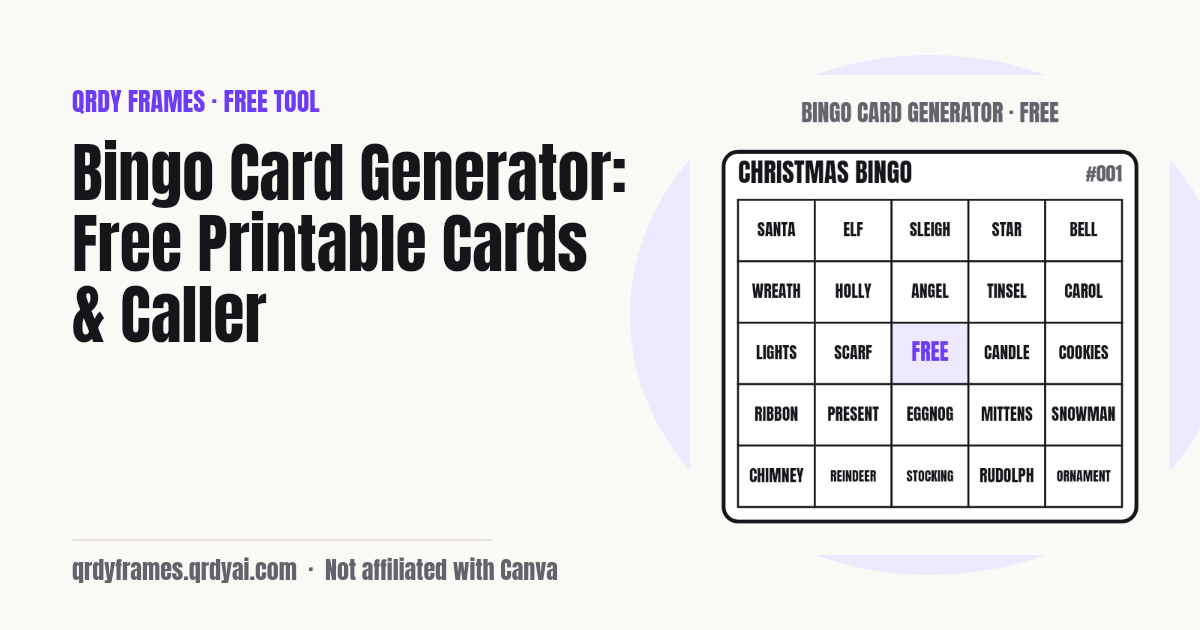
Add words, choose a grid and a number of cards, print: three steps, no sign-up, and the Christmas set with four 5x5 cards is already on screen when the page opens.
- Add your words: type one item per line in the box (emoji count as items, duplicates are removed), load a sample set such as Christmas, or switch Source to Numbers 1–75 for classic bingo.
- Choose the grid (3x3, 4x4 or 5x5), keep or remove the FREE centre, and set how many cards you need (1–200). The cards appear at once; every card is different, and the hint tells you how many items the grid needs.
- Press Print cards: 1, 2 or 4 cards per page on Letter or A4, black-and-white friendly, with the card title and a card number on each. Choose Save as PDF in the print dialog to keep a file. Then open the Caller tab to run the game.
How to call bingo
To call bingo, open the Caller tab and press Call next (or Space): the tool draws a word or number that has not been called yet, shows it large, and highlights it on the called board below, with a count such as "12 of 75 called". In numbers mode each call reads like a real bingo caller: B 7, N 42, O 68. Undo takes back a call made by mistake, and New game clears the board after a confirm step.
For a projector or TV, press F or Present: the page goes full screen with a dark background, the last call huge in the middle and the previous five calls under it, so the back of the room can read it. Space keeps calling, Escape exits. The calls of the current game are saved in this browser, so a reload or a closed laptop lid does not lose the round.
When someone shouts bingo, go to the Check tab and type their card number (printed on every card, e.g. #007). The tool rebuilds that exact card, marks the called items on it and tells you plainly whether it wins for the pattern you chose: any line, four corners or full card. FREE counts as marked.
Looking for the bingo caller directly? /tools/bingo-caller opens this page on the Caller tab. Calling from Canva slides? Spin Wheel Maker puts a clickable spin wheel inside the design, so the class watches the next word land on your slide: try Spin Wheel Maker in Canva.
Running bingo at a holiday party (remote or hybrid)
To run bingo at an office holiday party with people on Zoom or Teams and people in the room, give every guest their own card by link, print named cards for the room, call the game on a shared screen and post the winners at the end. Under the cards, Hand out cards takes the guest list (one name per line, or just a number of players), gives each guest the next unused card number and makes one link per guest that opens exactly that card, "Card #007 · for Sam", so no two people play the same card.
Copy all as one message turns the whole list into one ready-to-paste post for Slack, Teams or email; on a phone each row opens the share sheet. Print with names prints only the assigned cards, each with the guest's name above the card number, so printed and phone cards mix without duplicates. On their phones, guests tap the words as they are called and see how close they are ("Any line: 1 to go"); a full line shows a BINGO banner telling them to give the host their card number.
Plan the rounds under Caller › Advanced: round 1 any line, round 2 four corners, round 3 full card by default. When a card wins on the Check tab, Record winner saves the card and the guest's name, and Next round clears the calls. The Winners card is a 1080x1350 image (or 1080x1920 for stories) with the title, date, round and winners to post in the team channel, or copy the same as text. The last 10 parties stay with the set, and Run it again hands the same guests brand-new cards next time.
Splitting the party into tables first? The Random Team Generator makes fair teams from the same guest list, and the Classroom Timer keeps each round short.
Bingo card ideas
Bingo works for any list of words a group already knows: here are seven ways people use this page, from printable Christmas bingo cards to a vocabulary review.
- Christmas party: Load the Christmas sample set, print 4 cards per page, and call the words while the cocoa is hot; printable Christmas bingo cards in under a minute.
- Classroom vocabulary and sight words: Paste this week's words, 4x4 without FREE for younger pupils, one card per child, and the class reads each word as you call it.
- ESL and language lessons: Words in the target language on the cards, called in the native language (or the other way round) so every call is a quick translation.
- Baby shower: The Baby shower sample set has 32 items; add the parents' names and the due month for a personal card.
- Bridal shower: Type the couple's story in words (first date, the proposal spot, the honeymoon city); guests mark what they know.
- Team meetings: Phrases people say in every meeting as items; a bingo in the last ten minutes keeps everyone listening.
- Road trips: Things to spot through the window (red barn, licence plate from another state, cow); 3x3 cards keep it short for little ones.
Running the whole lesson? Time each round with the Classroom Timer, split players into tables with the Random Team Generator, settle a tie with the Yes or No Wheel or warm up with the Random Letter Generator.
Bingo patterns
A bingo pattern is the set of cells a card must have marked to win; the Check tab supports the three common ones. Any line (the default): five in a row horizontally, vertically or diagonally on a 5x5 card (three or four on the smaller grids). Four corners: the four corner cells only, a quick pattern for short rounds. Full card, also called blackout or coverall: every cell marked, usually the last round of the night.
On cards with a FREE centre, the middle cell counts as marked for every pattern, so a line through the centre needs one call fewer. Announce the pattern before the round starts and keep it for the whole round; the Check tab remembers your choice.
Where do my words go?
Nowhere: the words stay in your browser. Cards are built on your device, saved sets, settings and the current game live in this browser's local storage under one key (qrdy.bingo.v1), and the analytics record only settings and counts (grid size, number of cards as a range, which pattern was checked), never a word, title or set name. A set only leaves the page when you press Copy play link, and even then it travels inside the link's fragment (the part after #), which browsers do not send to servers.
Bingo card generator FAQ
Is the bingo card generator free?
Yes, completely: no account, no sign-up, no watermark on the printed cards and no limit on how many sets you make. It is one of the free tools made by the team behind Qrdy Frames.
How many bingo cards can I make?
Up to 200 cards per batch, with up to 300 words in a set. Print 1, 2 or 4 cards per page: 200 cards at 4 per page is 50 sheets. Make another batch with Generate new cards if you need more.
Are all the cards different?
Yes. No two cards in a batch have the same items in the same cells; the generator checks every new card against the ones before it. Each batch has a seed, so the same words and seed always give the same cards, which is how the play link and the winner check rebuild a card from its number. If a word list were too small to make the number of unique cards you asked for, the tool makes as many as it can and says so.
Can I make Christmas bingo cards to print?
Yes. The Christmas sample set (34 words: Santa, Reindeer, Snowman, Candy cane and more) is loaded when the page opens: set how many cards you need and press Print cards for printable Christmas bingo cards at 1, 2 or 4 per page. Edit the list to add your own family words, or type any theme you like.
How many bingo cards fit on a page?
1, 2 or 4, your choice under Print layout. One per page gives a large card for small children or a wall; two per page is the default; four per page fits a 5x5 card in about 9 cm squares on Letter and A4 and saves paper for a classroom. The print view has no site header, footer or ads, only the cards, each with its title and number.
Can I use pictures or emoji on the cards?
Emoji, yes: type one emoji (or a few) per line and they are placed in the cells like words, which makes a quick picture bingo for pre-readers. Uploaded images are not supported, so the tool stays fully in your browser and the print stays sharp in black and white.
How do I call bingo numbers 1–75?
Set Source to Numbers 1–75: cards become classic 5x5 B-I-N-G-O cards (B 1–15, I 16–30, N 31–45, G 46–60, O 61–75) and the Caller tab draws numbers from a 75-ball pool, shown as "B 7" or "N 42". Press Call next or Space for each ball, use Present for full screen, and the called board shows every number drawn so far.
How do I check who won?
On the Check tab, type the card number printed on the player's card (7 or #007) and pick the pattern of the round: any line, four corners or full card. The card is rebuilt with the called items marked and the result is spelled out: "Card #007 has BINGO: row 3" or "no bingo yet, 2 more on row 3". The check uses the current game's calls, so finish calling before you clear the board.
Can players use their phones?
Yes. Press Copy play link on the Cards tab and send it (chat, QR code, email): the link rebuilds the same set and seed on any phone, and a player picks their card number to see it large with tap-to-mark cells; marks are kept on that phone. The payload sits in the link's fragment, so it is never sent to a server. Links are capped at 2000 characters; a very long word list can be too big to share this way, and the tool tells you.
How do I give each person a different bingo card online?
Use Hand out cards under the cards: type the guest list (or a number of players) and every guest gets their own numbered link, so no two guests share a card. Each link opens exactly that guest's card on a phone or laptop, with their name on it; Copy all as one message makes one post for Slack, Teams or email, and Print with names covers the people in the room.
Are guest names uploaded?
No. Guest names stay in your browser and in the part of each link after #, which browsers never send to a server; the page also removes it from the address bar as soon as the card opens. Analytics only count that a link was copied or opened, never a name, word or title.
Is anything I type saved or uploaded?
Nothing is uploaded. Words, card titles, set names, the current game and your settings are kept only in this browser's local storage, and the analytics record only counts and settings, never your text. Clearing site data removes everything. If your browser blocks storage, the tool still works but cannot keep sets or settings, and the page says so.
More free tools
Every tool on this site runs in the browser: nothing you paste, type or upload is sent anywhere.
- Classroom Timer countdown with quick buttons, presets, chains and a Pomodoro mode
- Seating Chart Maker classroom seating charts: rows, pairs, groups, random shuffle with rules, weekly rotation
- 2027 Calendar printable 2027 calendar with US holidays, year or month pages, your own events
- Random Team Generator split names into fair random teams
- Yes or No Wheel spin for a yes or no, with history and best of 3
- Random Letter Generator random letters with no repeats, a letter wheel, random words
- Password Generator strong passwords, passphrases and PINs
- Bulk QR Code Generator one QR code per row of a class list or sheet
- Lorem Ipsum Generator dummy text with exact counts and placeholder images at any size
- Christmas Ornament Photo Maker
- Circle Crop Image
- Heart Photo Frame
- All free tools
About this site
Qrdy Frames previews custom photo frames for Canva designs; the free tools are a side project of the same team, which also makes Spin Wheel Maker. Not affiliated with Canva.